The Recap Data Manager is a powerful
event review and reporting system. Primarily for use with the Recon product line, Recap delivers extensive functionality to any
organisation tasked with incident recording. With an intuitive user
interface designed for accurate and optimum processing, users are
more likely to process incidents with fewer mistakes and in less time
– a cost saving on both counts. Recap Data Manager offers a
complete spectrum of functionality for dealing with multimedia event
data. Recap feature overview:
 Automated
Data Import into relational database Automated
Data Import into relational database
Picture
and/or video data including picture enhancement tools
Fast
event review
Varied
details fields
Offence
document creation
Graphical
user and management reporting with print option
System
audit trail for user security
For a more detailed list of features available
with Recap, see the ‘Key Features’ section at the bottom
of this page.
With the automatic import of the gathered event
data, be it picture, video, both or just text details a new record
is created in the Recap relational database. The database has many
fields for use in recording the details of the event. Some of these
fields are automatically filled from imported data, some automatically
from external databases (such as vehicle identification information)
and some for the user to add notes and miscellaneous information.
All information is automated where possible and intuitive navigation
shortcuts provided where the user must input information.
Picture clarity enhancement tools are provided in the interface
to aid the user in correctly identifying important information.
Uniquely, video data frames can be extracted by the user and enhanced
in the same way as pictures. This extended use of tools ensures
the maximum information is gained from visual data. These tools
do not allow the user to actually change the data, just the viewed
version – to actually change the data may compromise a trial
if it is used in evidence.
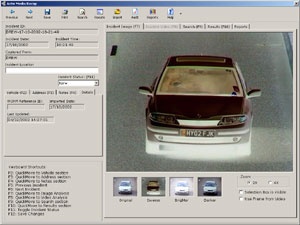 Inverse video filter
|
|
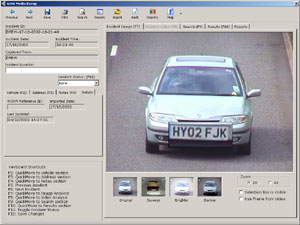 Zoom into areas of the
image
Zoom into areas of the
image |
|
Recap offers the ability to highlight an area of the picture data
as a ‘region of interest’ for use in an offence document.
In the case of Recap being used to review data generated by Recon
ANPR, the number plate area is automatically highlighted as a region
of interest. The net result of this operation is that the offence
document not only shows a contextual view of the offence but a zoomed
area showing the vehicle number plate for easier confirmation of
identity. This feature is equally as useful for offences and incidents
not involving vehicles. The region of interest, for example, can
be used to magnify a persons face or body.
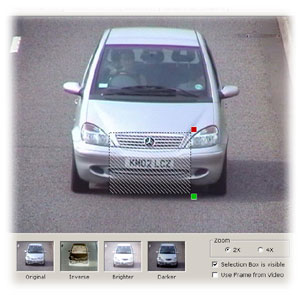 Selecting the region of
interest
Selecting the region of
interest |
|
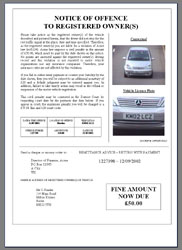 Offence notice
|
|
Recap can use its relational database to access the history of
events that have been processed in order to produce graphical reports.
These reports are quick to run and can be personalised to each customer
to best fit their reporting format. Report criteria can be extended
if the default reports do not completely fit requirements without
extensive changes to the program. The reports can be viewed onscreen
in a variety of formats as well as printed to form management summaries
of ongoing processing.
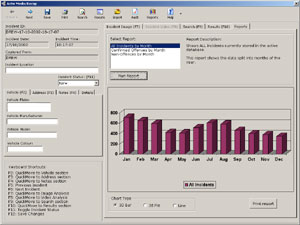 Graphical reporting
|
|
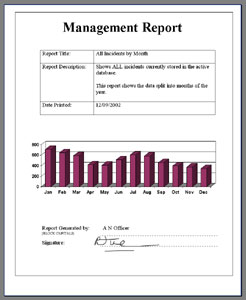 Management report
 |
|
As database information grows the need
for comprehensive search functionality becomes more apparent. Recap
provides powerful search functionality allowing the user to pinpoint
individual records or groups of records with ease. The search screen
has frequent searches available as single click buttons and more
comprehensive searches are achieved by providing simple additional
information. The results of the search are produced in a list that
can be navigated without viewing every record. To ensure security
and integrity of data, an audit trail of operations performed is
kept and can be used to aid proving continuity of evidence.
| |
Multi source compatible |
| |
Automated network import |
| |
Automated removable media import |
| |
Import source identifier |
| |
Intuitive user interface |
| |
Picture enhancement tools |
| |
Region of interest selection |
| |
Video review |
| |
Video frame extraction |
| |
Event details |
| |
Offence notice printing |
| |
Comprehensive search tools |
| |
Audit trail and review |
| |
Graphical reporting |
| |
Keyboard shortcuts and onscreen
help for speedy processing |
| |
Multiple image zoom levels |
| |
Multi data format – e.g.
events can include Video AND stills |
| |
Formatted to enable full video frame
viewing |
| |
Incident categorisation |
 Click here to email us about related products. Click here to email us about related products.
 Click here to visit vendor website. Click here to visit vendor website. |











 Developed for: