| Developed for: 
Central Management Console is an intuitive
system for accessing and managing local and distributed devices (known
as nodes) deployed in any organisation. Not only is CMC ideal for
management of installed in house products but also as an integrator
of other products supplied by third part vendors. Due to CMC’s
configurable nature, any visual representation of your estate can
be shown on screen allowing intuitive and easy navigation.
CMC’s functionality allows the user to:
 Launch
chosen applications with automated data assignment Launch
chosen applications with automated data assignment
Customise
the user interface
Drill
down device hierarchy
Navigate
picture representation of your estate
Add/Remove/Edit
devices
Execute
default applications on a per device basis
Perform
real-time device status enquiry
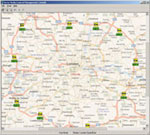
Typical Main Screen
|
The Central Management Console is a fully configurable interface for devices deployed
in any organisation. When the application is first installed, the
supervisor user has the opportunity to begin tailoring their system
for their needs. To start, a picture background can be added to represent
the first stage of a hierarchy (if that is the device structure design
choice). To follow, additional hierarchy layers can be added with
their own backgrounds or device icons may be placed directly on the
first image surface to represent the devices deployed.
Devices and hierarchy layers can be added at
any time and during use (if in supervisor mode) and so the configuration
of the system can be grown over time while remaining active in its
role. Large or small images may be used to tailor the system either
from the image pack provided as part of the installation or supplied
from other sources.
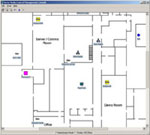
Versatile Image Support
|
This versatile use of images allows CMC to become
an integrated part of the organisation into which it is installed.
For example, devices such as CCTV cameras may be represented as
icons on the actual floor plans of the installed building or rack
based PC’s may be represented as icons on a photograph of
the actual rack in which they reside.
To aid navigation around CMC’s screen,
pan and zoom functionality is available to help with screens
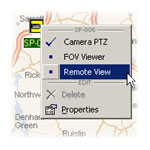
Configurable Interface |
that
may contain many devices. Device icon positioning is kept in proportion
to the original placement to keep relative positions correct. Device
icon settings can be edited in any zoom ratio allowing fine adjustment
to placing to be made.
In supervisor mode, any relevant data can be assigned to a device
for use in spawning control, transport or interrogation application
utilities. This information can be accessed by the user to help support
the device, such as installation notes or network IP address. This
information may also be used by third party applications either purchased
or developed in house. The information may also be used by applications
that have been developed by Actis Media such as the Remote
View module that transports captured video across communications in
real time.
| |
Customisable graphical
interface |
| |
Individual device representation
colour schemes |
| |
Supplied with map pack |
| |
Integration of third
party products |
| |
Control 1 to 10000+
devices |
| |
User level security |
| |
SQL relational database |
| |
Pan and Zoom |
| |
Real time hierarchy management |
| |
User defined data fields |
| |
Optional defined data or system
variables passed to spawned applications |
| |
LAN/WAN device status checking |
 Click
here to email us about related products. related products.
Click
here to email us about related products. related products.
 Click here to visit vendor website. Click here to visit vendor website. |